
Rooms & beds
Every block, floor, room and bed with live occupancy, rent and upkeep.
Explore rooms & bedsSmart hostel management platform
Manage students, rooms, admissions, allocations, documents, leave, vehicles, fees and day-to-day hostel operations through one centralized digital platform.
The platform
Connected modules grouped the way wardens and administrators actually work, sharing one record for every student and every room.
Every block, floor, room and bed with live occupancy, rent and upkeep.
Explore rooms & beds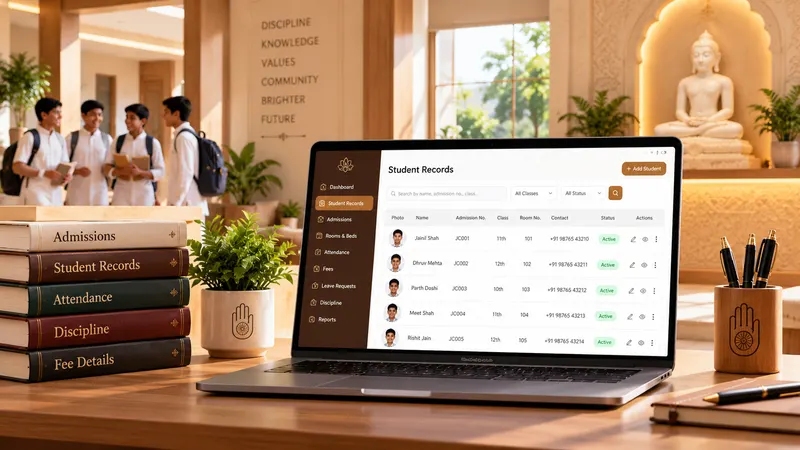
One profile per resident, from admission paperwork to yearly renewal.
Explore student records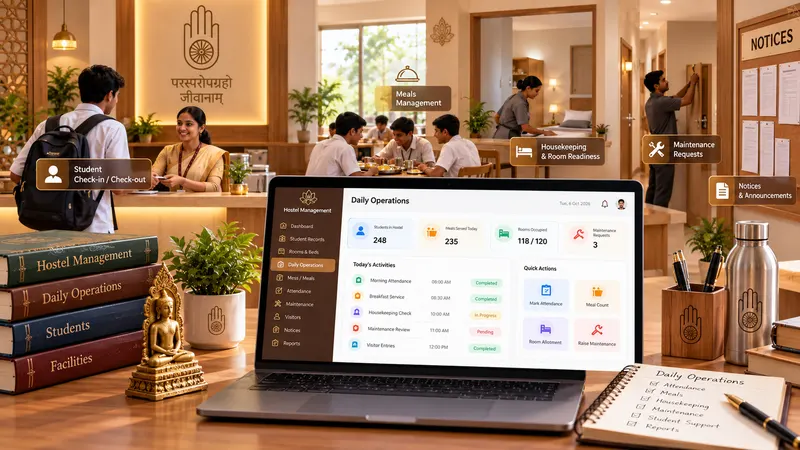
Requests the warden’s office handles every day, each with a clear status.
Explore daily operations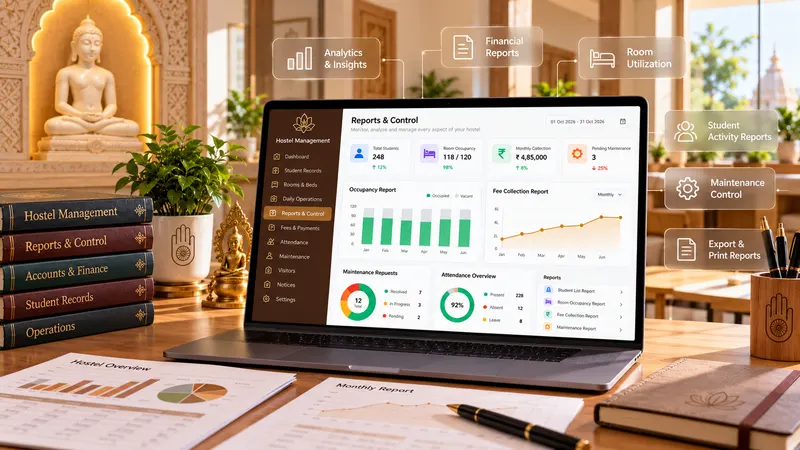
Reports, staff, monitoring and the rules that shape how your hostel runs.
Explore reports & controlComplete hostel operations
Pick a module to see what it handles. Each one keeps its own records and statuses, and all of them share the same students and rooms.
Module 1 of 31
Now exploring
A searchable register of every resident with roll number, room, program, year, phone and status.
Find anyone by name or roll number.
Narrow the list by course and status.
See who is active or still waiting for a room.
One record with every module’s history.
Student phone number on every row.
Issued in sequence from H-001.
Module 1 of 31
Now exploring
A searchable register of every resident with roll number, room, program, year, phone and status.
Find anyone by name or roll number.
Narrow the list by course and status.
See who is active or still waiting for a room.
One record with every module’s history.
Student phone number on every row.
Issued in sequence from H-001.
Module 2 of 31
Now exploring
Online registrations move through review, approval or the waitlist, with gender and community counts in view.
Applications arrive straight from the online form.
Approve, reject or hold each application.
Keep applicants in line when beds run out.
Boys, girls and each community at a glance.
Check uploads before you decide.
Download the template, import or export lists.
Module 3 of 31
Now exploring
Set the admission year, open or close admissions, and configure fees by community and gender.
Each year has its own configuration.
Control when applications are accepted.
Different fees for each combination.
Refundable deposit, first and second term.
The rules every applicant must accept.
See who has accepted the rules.
Module 4 of 31
Now exploring
Parents follow their child’s attendance, fees, leave and room details from a portal of their own.
Father and mother tied to the profile.
Daily attendance visible to parents.
What has been paid and what is due.
Every leave request and its status.
Block, room and bed always current.
Parents hear when something changes.
Module 5 of 31
Now exploring
The master list of rooms with floor, block, type, capacity, occupied beds, rent and status.
Occupied beds against capacity for each room.
Track availability block by block, floor by floor.
Single, double and triple rooms.
Monthly rent set for every room.
Take a room out of use while it is repaired.
Available, occupied and maintenance at a glance.
Module 6 of 31
Now exploring
Allocate a free bed to a student and keep the assigned date on record.
Allocate a free bed to a waiting student.
Full or closed rooms are never offered.
The move-in date stays on record.
Every current allocation in one list.
Dashboard counts update instantly.
Each resident’s course beside their room.
Module 7 of 31
Now exploring
Release a bed when a student moves out or changes room, with a confirmation step.
Free a bed when a student leaves.
Releasing always asks before it happens.
Reverse an accidental release.
The bed is offered for assignment again.
Past rooms stay on the student’s record.
Release and reassign to move a student.
Module 8 of 31
Now exploring
Book guest rooms from request to check-out, with room type, number of rooms and nights.
Requests wait for confirmation.
Fully or partially assign the rooms asked for.
Room type, number of rooms and nights.
Track every guest through their stay.
Closed requests kept on record.
All checked-out guests in one list.
Module 9 of 31
Now exploring
A ten-point checklist that tracks each new resident from paperwork to move-in.
Ten steps from admission form to mess registration.
Tracked on its own so it is never missed.
Consent form status for every student.
Guardian captured before move-in.
See how far each student has got.
Pending, active or completed.
Module 10 of 31
Now exploring
Students apply for leave with dates and a reason; wardens approve and track returns.
Students apply with from and to dates.
Leave length is worked out automatically.
Move requests through each status.
Quick checks without opening the profile.
Requests awaiting approval reach the dashboard.
Feeds straight into the Leave Report.
Module 11 of 31
Now exploring
Mess menus by date, meal timings, tiffin and meal skip requests, guest tokens and biometric meal logs.
Breakfast, lunch and dinner by date.
Serving hours for every meal.
Pending, approved and active tiffins.
Meals for visiting guests.
Students skip a meal in advance.
Daily boiling records per block.
Module 12 of 31
Now exploring
Complaint tickets mapped to student, room, block and bed, worked from open to resolved.
Raised with a date and description.
Electrical, plumbing, furniture and more.
Student, room, block and bed on each ticket.
Open, in progress and resolved.
Find any past complaint.
See which categories come up most.
Module 13 of 31
Now exploring
Register bicycles, two-wheelers, scooters and cars parked on campus.
Bicycles, two-wheelers, scooters and cars.
Recorded with each registration.
Plate number ready for gate checks.
Helps security identify the vehicle.
Every vehicle belongs to a student.
Passes switch off when a student leaves.
Module 14 of 31
Now exploring
A structured way for students to raise ideas about food, facilities, safety and rules.
Students submit ideas from their portal.
Food, facilities, cleanliness, security, rules, other.
Raised, in progress and resolved.
Every suggestion is dated for follow-up.
Record a suggestion on a student’s behalf.
See which areas get the most requests.
Module 15 of 31
Now exploring
Organise clubs into groups with a purpose and leader; students submit the clubs they want to join.
Arts, literature, science, sports and technology.
Name, main purpose and created date.
A student leads each club.
Students pick as many clubs as they like.
By student or by club.
Download submissions for the coordinator.
Module 16 of 31
Now exploring
Record full waivers and partial reductions with the reason and approval status.
Full waivers and partial reductions.
Every waiver is logged against the actual fee.
The remaining amount is worked out for you.
Merit, hardship, sports quota and more.
Pending, active or completed.
Total waived across all students.
Module 17 of 31
Now exploring
Collect and verify identity, medical and consent documents for every resident.
Aadhaar, PAN, passport and certificates.
Mark each document as verified.
Missing documents stand out.
Know when each file arrived.
Only authorised staff can open them.
Every required document in one view.
Module 18 of 31
Now exploring
Each student is linked to a guardian with relation and phone numbers.
Every student linked to a guardian.
Guardian and student numbers side by side.
Father, mother or another guardian.
Part of the move-in checklist.
Change numbers when they change.
Visible only to hostel staff.
Module 19 of 31
Now exploring
A directory of hostel staff and emergency services with hours of availability.
Warden, assistant warden, mess and admin office.
Fire, ambulance and police numbers.
Reach anyone in one tap.
The hours each contact can be reached.
Clinic hours on hand.
Report repairs to the right person.
Module 20 of 31
Now exploring
Employees, daily check-ins and other staff with roles, reporting managers and week offs.
Contact, email, role and joining date.
Who is on duty today.
Security, housekeeping and kitchen staff.
Each employee’s reporting line.
Weekly off day per employee.
Keep past staff on record.
Module 21 of 31
Now exploring
Selected trustees receive operational and daily reports directly on WhatsApp.
Trustees and members with their numbers.
Reports go to the number on record.
Choose who gets the daily report.
Send the latest report in one click.
Pause a member without deleting them.
When each member was added.
Module 22 of 31
Now exploring
Maps hostel students and staff to their biometric attendance device identities.
Person type, code and name.
The ID used on the device.
Linked for staff attendance.
Yes or no, flagged per person.
Gaps stand out before payroll.
Kept on the mapping record.
Module 23 of 31
Now exploring
Record discipline and behaviour incidents and maintain the behaviour type master.
Incident date, reason and marks.
Late entry and other types you define.
Where the student lives.
Marks deducted per incident.
By student or behaviour type.
Download for reviews and parents.
Module 24 of 31
Now exploring
Define the hostel itself: name, blocks, floors, rooms, bed capacity and room types.
The name used across the platform.
The shape of the building.
Rooms available for assignment.
Total beds across all rooms.
Single, double and triple.
Room Master and the dashboard read from it.
Module 25 of 31
Now exploring
Switch hostel policies on or off and publish the rules every resident follows.
Set when the gate closes.
Record every visitor at the gate.
Turn fingerprint check-in on or off.
Enrol every resident in the mess.
Switch facilities on or off.
Publish the rules every resident follows.
Module 26 of 31
Now exploring
Track furniture and fittings per room with stock, condition and last inspection.
Beds, desks, fans, chairs and more.
What each room should have.
Units held across the hostel.
Good or fair, item by item.
Date of the latest inspection.
Items in fair condition are flagged.
Module 27 of 31
Now exploring
Organisation-wide assets with company, location, owner, department, value, maintenance and AMC.
Laptops, electronics and equipment.
Where it is and who it belongs to.
The person responsible for it.
Quantity, amount and date bought.
Assets under repair are flagged.
Know when contracts run out.
Module 28 of 31
Now exploring
See how many students from each academic program live in the hostel.
From B.Tech to Ph.D and diploma.
Enrollment for each program.
How many of them live in the hostel.
Percentage of each program in residence.
See which courses fill the hostel.
Update the numbers each academic year.
Module 29 of 31
Now exploring
A report of every registered vehicle mapped to its owner’s block and room.
All registered vehicles in one report.
Where each owner lives.
Counts for each vehicle type.
Ready for gate checks.
Inactive vehicles shown separately.
Download a copy for the security desk.
Module 30 of 31
Now exploring
A history of all leave taken, for attendance reviews and parent queries.
Complete history across residents.
Days added up across requests.
Why each student was away.
Pending, active and completed.
Answer questions with dates on hand.
Download for reviews and audits.
Module 31 of 31
Now exploring
Students renew their stay for the next academic year in a single form.
Renew for the next academic year.
Taken from Room Assignment.
Change requests go to the warden.
Recorded with the renewal.
UPI, bank transfer, cheque or cash.
Special requests noted for staff.
Student lifecycle
Every module fits a moment in a resident’s stay, so nothing is entered twice and nothing falls between offices.
An approved application creates the student record and roll number.
Forms, documents and a guardian contact are collected.
A free bed is allocated and the date is recorded.
Leave, vehicles, suggestions and fee support during the stay.
Each academic year the student renews their stay.
The bed is released and returns to the free pool.
Admission & onboarding
After admission, each student works through a ten-point checklist. Medical and consent forms are tracked on their own because they matter most.
5 of 10students fully onboarded
Room assignment
Assignment only offers rooms with free beds. Releasing a bed asks for confirmation and can be undone.
Complaint management
Every ticket is mapped to its student, room, block and bed, and moves from open to in progress to resolved.
Complaint category master
Canteen & food management
Breakfast, lunch and dinner menus by date, tiffin and meal skip requests, guest meals and biometric meal logs, all from one Canteen & Food module.
Today’s mess, requests and logs
Leave management
Students apply with a reason and dates. The number of days is counted for them, and wardens move each request from pending to active to completed.
Vehicle management
Vehicle Registration records each vehicle with its owner, and the Vehicle Report maps it to a block and room for the security desk.
GJ 01 AB 1234
GJ 05 CD 5678
No registration plate
GJ 03 EF 9012
MH 02 GH 3456
RJ 14 IJ 7890
No registration plate
DL 04 KL 2345
UP 32 MN 6789
No registration plate
Fee waiver
Full waivers and partial reductions are logged against the original fee with the reason, so the accounts office always knows what is payable and why.
Clubs & student engagement
Club Management organises clubs into groups with a purpose and a leader. Through Club Submission, each student picks as many clubs as they like.
Staff & administration
Employee Management covers wardens, mess and maintenance staff with check-ins and reporting lines. Trustee WhatsApp sends the day’s report to the trustees you choose.
| Employee | Contact | Joined | Reports to | Week off | Status |
|---|---|---|---|---|---|
| Dr. Rajesh KumarHostel Warden | +91 98765 00001warden@hostel.org | Jun 2019 | Trust Office | Sunday | Active |
| Sunil PatelAsst. Warden | +91 98765 00002asst.warden@hostel.org | Jan 2022 | Dr. Rajesh Kumar | Monday | Active |
| Meena SharmaMess Incharge | +91 98765 00003mess@hostel.org | Aug 2021 | Dr. Rajesh Kumar | Tuesday | Active |
| Ravi ChauhanMaintenance Head | +91 98765 00006maintenance@hostel.org | Mar 2020 | Sunil Patel | Sunday | Inactive |
| Employee | Contact | Joined | Reports to | Week off | Status |
|---|---|---|---|---|---|
| Dr. Rajesh KumarHostel Warden | +91 98765 00001warden@hostel.org | Jun 2019 | Trust Office | Sunday | Active |
| Sunil PatelAsst. Warden | +91 98765 00002asst.warden@hostel.org | Jan 2022 | Dr. Rajesh Kumar | Monday | Active |
| Meena SharmaMess Incharge | +91 98765 00003mess@hostel.org | Aug 2021 | Dr. Rajesh Kumar | Tuesday | Active |
| Ravi ChauhanMaintenance Head | +91 98765 00006maintenance@hostel.org | Mar 2020 | Sunil Patel | Sunday | Inactive |
| Employee | Role | Check-in | Check-out | Status |
|---|---|---|---|---|
| Dr. Rajesh Kumar | Hostel Warden | 8:02 AM | — | On duty |
| Sunil Patel | Asst. Warden | 8:15 AM | — | On duty |
| Meena Sharma | Mess Incharge | 6:05 AM | 2:10 PM | Checked out |
| Ravi Chauhan | Maintenance Head | — | — | Not in yet |
| Name | Role | Contact | Shift | Status |
|---|---|---|---|---|
| Ramesh Yadav | Security Guard | +91 98110 22001 | Night | Active |
| Kamla Devi | Housekeeping | +91 98110 22002 | Morning | Active |
| Mohan Lal | Cook | +91 98110 22003 | Morning | Active |
| Suresh Kumar | Electrician | +91 98110 22004 | On call | Inactive |
Biometric & behaviour monitoring
Biometric Mapping links students and staff to their attendance device identities. Student Behaviour records discipline incidents against a master list of behaviour types.
| Person | Type | Birthday | Biometric ID | Employee code | Biometric missing | Code missing |
|---|---|---|---|---|---|---|
| Aarav JainH-001 | Student | Mar 14 | BIO-1001 | — | No | No |
| Vikram SinghH-005 | Student | Aug 02 | — | — | Yes | No |
| Sunil PatelE-002 | Employee | Nov 21 | BIO-2002 | EMP-102 | No | No |
| Ravi ChauhanE-006 | Employee | Feb 09 | BIO-2006 | — | No | Yes |
Returned at 10:40 PM after curfew
Room not cleaned before inspection
Gate entry at 10:25 PM
Reports & analytics
Leave and vehicle reports, occupancy, fee support and compliance are calculated from live records and can be exported in one click.
away across 10 requests
of 10 registered vehicles
10 of 20 beds occupied
waived across 10 students
requested documents verified
students fully onboarded
Why this platform
Admission, room, documents, leave and fees stay on the same profile.
Beds update the moment a room is assigned or released.
Identity and medical documents are stored with role-based access.
Wardens approve requests from a phone; admins work from a desktop.
Uses the same members, payments and notifications as the rest of the platform.
Every report downloads for audits, trustees and parent queries.
We’ll walk you through rooms, admissions, leave and reports using a setup that matches your blocks and floors.